- Kitchen – healthy cooking:
- counter activity detection:
- add container
- add ingredient to container
- remove the whole container (with ingredients if any)
- remove ingredients on container only
- related work arrangement
Tuesday, December 26, 2006
weekly report 12/18-12/24

Sunday, December 17, 2006
weekly report 12/10 - 12/17
- Kitchen – healthy cooking:
- counter:
- install 4 sensors
- program done: can detect object's position (accuracy: 1cm) and its weight
Thursday, December 07, 2006
weekly report 12/4 - 12/10
- kitchen
- program with weight numbers
- can calculate weight of object in the cabinet
- can display weight line chart
- can filter noise (e.g. using knife, put on hands and take off quickly)
- can accept rolling on surface
- can check objects' location on the stove (front or back)
- testing 2 new sensors for counter
- goal to submit HCI and CHI work-in-progress
- paper reading
- “Voice Access of Global Information for Broadband Wireless: Technologies of Today and Challenges of Tomorrow”, Proceedings of IEEE, Jan 2001
- prepare Digital Speech Processing midterm exam (12/15)
Thursday, November 30, 2006
weekly report 11/27 - 12/3
Weekly report (2006/11/27 – 2006/12/3)
- kitchen
- sensor testing, re-installation (Both of cabinet and stove have passed the test of weights!!!)
- buy fire extinguisher
- paper reading: (summary: as the attachments)
- Reiko Hamada , Ichiro Ide , Shuichi Sakai , Hidehiko Tanaka, Structural analysis of cooking preparation steps in Japanese, Proceedings of the fifth international workshop on on Information retrieval with Asian languages, p.157-164, September 30-October 01, 2000, Hong Kong, China
- Siio's papers:
- 椎尾 一郎, 浜田 玲子, 美馬 のゆり, Kitchen of the Future: コンピュータ強化キッチンとその応用, コンピュータソフトウェア (日本ソフトウェア科学会) Vol. 23, No. 4, pp. 36-46, ISSN0289-6540, 岩波書店, 2006
- 椎尾 一郎, 宮澤 寛, 美馬 のゆり, "Kitchen of the Future: 調理を記録・公開・再生するキッチン", 第12回インタラクティブシステムとソフトウェアに関するワークショップ (WISS 2004), 日本ソフトウェア科学会研究会資料シリーズ, ISSN 1341-870X, No. 34, pp. 5-8, 2004.12.1-3.
- Itiro Siio, Noyuri Mima, Ian Frank, Tetsuo Ono, Hillel Weintraub, "Making Recipes in the Kitchen of the Future", Extended Abstracts, Conference on Human Factors in Computing Systems (ACM CHI 2004), page 1554, April 24-29 2004, Vienna, Austria.
- 美馬のゆり, 有田志子, 椎尾 一郎, 「学びの場としてのキッチン:ITキッチンの提案」 日本教育工学会第20回全国大会, pp..229-232. 2004.9.23-25.
- 椎尾一郎, 美馬のゆり, Ian Frank, 小野哲雄, Hillel Weintraub, "Kitchen of the Future: レシピ作成を支援するキッチン", 情報処理学会シンポジウムシリーズ, インタラクション2004論文集, ISSN-1344-0640, Vol.2004, No. 5, pp. 237-238, (社)情報処理学会, 2004.3.4-5 (2004.3.5).
- CHI2005 Work-in-progress browsing
- related projects/people:
- Counter Intelligence
- Bradbury, J. S. -- author of Hands On Cooking
- CALO - lab of activity recognition...
- book reading:
- The World is Flat, Chap 1,2
Friday, November 24, 2006

Thursday, November 23, 2006
weekly report 11/20 - 11/26
Weekly report (2006/11/20 – 2006/11/26)
- Kitchen – healthy cooking:
- sensor tuning - found out the problem to cause unstable (board setting over sensors)
- camera and hand tracking survey - normal 320x240 webcam will be enough for tracking
- visiting Siio's kitchen and lab in Tokyo (11/21)
- paper reading:
- PowerLine Positioning: A Practical Sub-Room-Level Indoor Location System for Domestic Use (also presented in lab seminar)
- Mobile Learning in Japan: Why the Future has Already Arrived in Asia, By Michael K. Kato and Vincent C. Ricci (a friend who has BS at Stanford and Master at NYU shared his article with me)
- (prepare for 11/29 AI midtern exam)
Wednesday, November 15, 2006
your way to coway
competition website
There are a lot of interesting works about kitchen - take a look!
There are a lot of interesting works about kitchen - take a look!
cutting scale
news
website
website
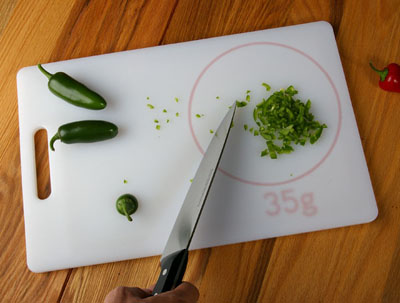
CUTTING SCALE 2006
"Here is a concept for a cutting board that has an integrated scale
within a defined area on it's surface. Ingredients can be cut and
measured on the same surface with very little extra effort.
There has been a tranformative trend in cooking based around the
science of food. Central to this is the idea that precise measurement
leads to more possibilities for new flavors. Recipes will become more
demanding, requiring simple ways to be precise in the kitchen.
Cutting scale, measures 10" x 15" and has won a 3rd place in
designboom's "your way to coway" competition. Exhibition in Seoul
Korea to be announced."
weekly report 11/13 - 11/19
Weekly report (2006/11/13 – 2006/11/19)
- Kitchen – healthy cooking:
- meeting: discuss recognition twice
- matrix of cooking spaghetti - analyze and discussion
- finish:
- install sensors of stove
- test weight sensors (very unstable now - need to revise sensor deployment)
- RFID reader almost ready
- install a PC in kitchen (but wire to monitor has to be re-deployed)
- paper reading:
- PowerLine Positioning: A Practical Sub-Room-Level Indoor Location System for Domestic Use (30%)
- book reading
- "designing for interaction", chapter 5
Monday, November 13, 2006
Reactable - modular (audio) synthesis

news in Engish
This is so cool!!!!
The interaction and interface are pretty.
But is it easy to learn? There are so many components!

Friday, November 10, 2006
weekly report 11/06 - 11/12
Weekly report (2006/11/06 – 2006/11/12)
- Kitchen – healthy cooking:
- install sensors of cabinet (under the countertop)
- stove testing and plan for install sensors under the stove
- paper reading:
- Cook's Collage: Deja Vu Display for a Home Kitchen, proceedings of HOIT: Home-Oriented Informatics and Telematics 2005
http://www3.cc.gatech.edu/fce/ecl/projects/dejaVu/cc/index.html - Memory for Actions: Designing a Cognitive Augmentation System, in Abstract Proceedings of CAC: Cognitive Aging Conference 2006
- Ferret: RFID Localization for Pervasive Multimedia, proceedings of ubicomp2006
- book reading
- "designing for interaction", chapter 4-5
Thursday, November 09, 2006
weekly report 10/30 - 11/05
Weekly report (2006/10/30 – 2006/11/05)
- Kitchen – healthy cooking:
- IKEA kitchen installation ready (11/1)
- Plan / discussion of installing sensors
- sensors and devices are ready in lab now
- install from Monday
- Nutrition info survey
- Current methods to measure nutrition facts
- Research institutes in Taiwan:
- It seems 台大食品科技所 is not suitable for us to cooperate –
different focus. Should check Medical School. - Finish to read one book about nutrition
- There are some diseases we can focus on, e.g. 痛風,
but we can't focus on obesity - Also there are many points of views that support us to
work on smart kitchen - Safety related plan
- ·Paper reading:
- 1. Intelligent Bathroom
- 2. The Diet-Aware Dining Table to Observe Dietary Behaviors
and the Smart Lunch Tray to Persuade Healthy Dietary Behaviors - Book reading:
- 1. "designing for interaction", chapter 4
- 2. (a book about nutrition)
weekly report 10/8 - 10/29
3-Week report (2006/10/8 – 2006/10/29)
- CHI 2006 Interactivity:
- Revised interface with Denny and Jack
- 6-page extended abstract with Jackie
- Supplements
- Video (about 3.5 minutes)
- Submitted: 2006/10/20 by Jackie
- Kitchen – healthy cooking:
- Visited IKEA with Jenhao (10/13)
- Confirm the layout and types of kitchen components
- Ordered load cells
- Bought IKEA kitchen in IKEA (10/28)
- Paper reading:
- (Ubicomp2006 conference paper) SenseCam: a Retrospective Memory Aid
- (Ubicomp2006 video paper)*5
- Spalogue: Designing Men-Women Communication in a Public Bath
- Designing Systems of Ubiquitous Sports Equipment
- Interactive Gigapixel Prints: Large, Paper-Based Interfaces for Visual Context and Collaboration
- Wizard of Oz Sketch Animation for Experience Prototyping
- Sketch-A-Move - Design Inspired Technology for Children
- Book reading:
- "designing for interaction", chapter 1~3
- Summarize the trip to US (ubicomp2006, YEF to companies, Berkeley, MIT, etc.)
Sunday, November 05, 2006
holography
Holography全像攝影
Last month we saw this @MIT Musuem
(利用雷射反射成像,從不同角度看會有不同的面貌 - e.g. from smile to wave to kiss)
http://en.wikipedia.org/wiki/Holography
This evening I went to elite (敦南誠品)
and found Bluestone(青石) has it:
a piece of work with 15x10cm takes NTD2900.
Tuesday, September 19, 2006
RFID-enabled smart shelves
RFID-enabled smart shelves heading into stores?
Posted Sep 17th 2006 3:02PM by Darren Murph, Engadget

Thursday, September 14, 2006
Monday, September 11, 2006


wearable computing

Philips Lumalive
http://www.youtube.com/watch?v=vq20yg0vnjg
http://www.research.philips.com/newscenter/archive/2006/060901-lumalive.html
" The electronics, batteries and LED arrays are fully integrated and invisible to the observer and wearer.
The jackets feature panels of up to 200 by 200 mm², although the active sections can be scaled up to cover much larger areas such as a sofa. "
http://www.youtube.com/watch?v=vq20yg0vnjg
http://www.research.philips.com/newscenter/archive/2006/060901-lumalive.html
" The electronics, batteries and LED arrays are fully integrated and invisible to the observer and wearer.
The jackets feature panels of up to 200 by 200 mm², although the active sections can be scaled up to cover much larger areas such as a sofa. "
Daylight Projection Clock

News
"the projection intensifies and de-intensifies as needed given other ambient light"
Daylight Projection Clock
"Sensors will detect if the light in the room intensifies, and increase the strength of the projection"
Friday, September 01, 2006
First quantum cryptographic data network demoed
I like engadget,
slso engadget chinese :)
and this is interesting...
First quantum cryptographic data network demoed
slso engadget chinese :)
and this is interesting...
First quantum cryptographic data network demoed
Monday, August 28, 2006
Monday, August 21, 2006
Thursday, August 17, 2006
Wednesday, August 09, 2006
Tuesday, August 08, 2006
[UI] collaboration
wikipedia
- "Collaborate" implies "to work together on a project"
- Coordination:
- Shared objectives
- Need for more than one person to be involved;
- Understanding of who needs to do what by when
Friday, August 04, 2006
Thursday, July 27, 2006
Sunday, July 23, 2006
weekly report (7/17-8/13)
- reading papers:
- reading UI books
- Ch3
- complete BPs and E-pitch
- Longterm: glasses
- YEF: intimate objects
- 交接: Geta sandles
Friday, July 21, 2006
[vision] IBM veggie vision
VeggieVision: a high-tech version of the bar code scanner that will recognize fruits and vegetables and automatically enter the price into the checkout system
- IBM research: veggie vision
- IBM: green machine
- CBS news: veggie vision and smart carts
Sunday, July 16, 2006
[MIT] Reflective Mirror

- A mirror which also reflects intangible information about yourself
David Bouchard,Enrico Costanza and Sajid Sadi
MIT media lab
link here
"The goal of this project is to give users insight into their activy patterns by presenting them with an objective daily feedback integrated in a familiar routine context. We also put an emphasis on how to display such data in a subtle way so that it is non-intrusive.
We are investigating several applications of such a technology, including communication with mobile phones to collect behaviour data, face recognition to identify members of a family as well as clothing store application."
weekly report (7/10-7/16)
- reading papers and the book
- paper review
- ARIS
- Concepts that Support Collocated Collaborative Work Inspired by the Specific Context of Industrial Designers
- 7/11
- Longterm discussion and survey
- YEF discussion and survey: doing intimate object related
- 7/12
- (Longterm) discussion (questionnaire, product) and survey
- (YEF) intimate object discussion and survey, product and logo images, abstract complete
- 7/13
- complete ARIS review
- (YEF) intimate object survey, Business Plan structure
- (Longterm) discussion and survey
- 7/14
- (YEF) discussion, visit CEO of 永豐餘 for ideas
- 7/15
- (YEF) discussion - products and BP
- (Longterm) complete questionnaire
- 7/16
- (YEF) discussion - BP
- really sorry that this week is all for 2 competitions, although they are both about ubicomp.
both deadlines are 7/21, for 30 and 40 pages each, so...
[CSCW] Collocated Collaborative Work
Concepts that Support Collocated Collaborative Work
Inspired by the Specific Context of Industrial Designers
H.Wang, E.Blevis
Human-Computer Interaction Design Group, School of Informatics, Indiana University, USA
CSCW 2004
Inspired by the Specific Context of Industrial Designers
H.Wang, E.Blevis
Human-Computer Interaction Design Group, School of Informatics, Indiana University, USA
CSCW 2004
- true:
- designers:
- tend to use large amounts of visual data
- need large workspaces to present information in the way that does not clutter the workspace, but is still easy to view and manipulate all at once
- especially when engaged in activities that involve sketching and annotation, it is imperative that interaction technologies do not impede the dynamic nature of the
interactions - Insights from observations:

- Seating orientation
- Reach
- Simultaneity
- Use of physical objects
- Large work-surfaces, one concept to a sheet, retrieval and comparison
- Privacy level
- Orientation of Documents
- Then they design concepts from observations
- My Thoughts:
- A good paper to understand ways and details of collaboration
- To design a good UI for collaboration, there are lots of things for us to think about and consider - we should match or apply these insights to the system

Saturday, July 15, 2006
transparent display

 背投式電視(microdisplay-based rear projection TV) v.s. transparent display (actually fake?!)
Wednesday, July 12, 2006
Nightmarket2006
 Organization
Co-chairman
Jackie Lee, Ph.D Candidate : ITRI/NEXT Fellow, MIT Media Laboratory
Wen-Jean Hsueh, Ph.D : Creativity Lab, Industrial Technology Research Institute (ITRI)
Prof. Hao-Hua Chu, Ph.D : Ubicomp Lab, National Taiwan University
Prof. Taysheng Jeng, Ph.D: Information Architecture Lab, National Cheng Kung University
Project Manager
Ohno Chih-Wen Hsieh : NCTU
Peggy Pei-Yu Chi : Ubicomp Lab, National Taiwan University
Innovation and Legal Consultant
Heather Yi-Hsin Tsai, Lawyer : LLM, Harvard Law School
news about our project: here
[UI] ARIS
ARIS: An Interface for Application Relocation in an Interactive Space
Jacob T. Biehl and Brian P. Bailey
Dept. of Computer Science, Univ. of Illinois Urbana, IL, USA
Graphics Interface 2004
Jacob T. Biehl and Brian P. Bailey
Dept. of Computer Science, Univ. of Illinois Urbana, IL, USA
Graphics Interface 2004
- ARIS:
- an interactive space window manager
- to enable a user to better manage information in an interactive space
- provides an iconic map of the space that enables a user to visually relocate applications among screens
- contribution: provide direct manipulation interface
- build on top of Gaia, a middleware OS that manages resources in their Active Space Lab
- iteration I: multiple Low-fidelity prototypes
- users dislike:
- select and drop
- use of a back and forth gesture
- textual list
- users like:
- select a button from the title bar
- iconic map interface
- want strong orientation cues
- iteration II: revised low-fidelity prototype
- lessons learned:
- enable a user to initiate a window relocation task from a window's title bar
- a 2D iconic map of the space may be good enough for window relocation tasks
- provide feedback:
- in the space as a user interacts with the iconic map
- that transcends the end of the relocation task
- users believe that the use of an interactive space could enhance collaborative work
- ...
- My Thoughts:
- although our scenario is different from theirs, and also we want it to be automatic map, however, is the difference big enough? Or we just combine different works together?
- speaking to UI, our original rough idea is almost the same... just that users don't need to orient themselves
- doing rough prototypes => tradeoff: time and results/expectations
- we should really think of a novel and different interface to achieve our goal, or works are too similar, but, this is not easy
weekly report (7/3-7/9)
- reading the book: designing the user interface => notes Ch2
- reading paper: ARIS
- surveying UI related resources
Sunday, July 02, 2006
[UI] Ch2 Guidelines, Principles, and Theories
(Designing the User Interface, Ben Shneiderman and Catherine Plaisant, Addison-Wesley, 2004, ISBN 0-321-19786-0)
- 2.2 (specific and practical) Guidelines
- to record insights and guide the efforts of future designers
- the creation of a guiedlines document engages the design community in a lively discussion of input or output formats, action sequences, terminology, and hardware devices.
- examples: navigating the interface, organizing the display, getting the user's attention, facilitating data entry
- 2.3 (middle-level) Principles
- while guidelines are narrowly focuesd, principles tend to be more fundamental, widely applicable, enduring, and need more clarification.
- no single design can satisfy all users and situations => must characterize
- determine users' skill levels
- "know thy user" - difficult, often undervalued
- all design should begin with an understanding of the intended users, including population profiles
- the process of getting to know the users is never ending: much to know, keep changing
- novice of first-time users; knowledgeable intermittent users; expert frequent users
- identify the tasks
- the set of tasks must be determined before design can proceed => task analysis (involve long hours of observing and interviewing users)
- use a matrix of users and task - include frequenicies
- choose an interaction style (blending may be approprate when required tasks and users are diverse)
- direct manipulation
- users' tasks can be greatly simplified by visual representation of the world of action
- appealing to novice
- menu selection
- read a list of items => select the one most appropriate to their task => observe the effect
- have clear stucture to decision making
- for novice, intermittent users, applealing to frequent users
- form fillin (fill in the blanks)
- data entry is required
- see a display of related fields => move a cursor among the fields => enter data where desired
- some trainning may be necessary
- appropriate for knowledgeable intermittent users or frequent users
- command language
- provide strong feeling of being in control
- error rates are high, training is necessary, retention may be poor
- natural language
- limited sucess thus far
- provide little context for issuing the next command
- slower, more cumbersome
- knowledgeable users
- 8 golden rules of interface design
- strive for consistency
- cater to universal usability
- offer informative feedback
- design dialogs to yield closure
- prevent errors
- permit easy reversal of actions
- support internal locus of control
- reduce short-term memory load
- 2.4 (high-level) Theories
- levels of analysis throries
- (top-down nature, convenient, effective in early days with command-line input, but relevant today)
- conceptual level - users' mental level of interactive system
- semantic level - decribes the meanings conveyed by user's input and by computer's output display
- syntactic level - defines how user actions that convey semantics are assembled into complete sentences that instruct the computer to perform certain tasks
- lexical level - deals with device dependencies and with the precise mechanisms by which users specify the syntax
- stages-of-action models
- 7 stages of action that users go through in trying to use interactive products (arranged in a cyclic pattern):
- forming the goal
- forming the intention
- specifying the action
- executing the action
- perceiving the system state
- interpreting the system state
- evaluating the outcome
- 4 principles of good design:
- the state and the action alternatives should be visible
- there should be a good conceptual model with a consistent system image
- the interface should include good mappings that reveal the relationships between stages
- users should receive continuous feedback
- critical points where user failures can occur: users...
- can form an inadequate goal
- might not find the correct interface object 'cuz of an incomprehensible label or icon
- may not know how to specify or execute a desired action
- may receive inappropriate or misleading feedback
- GOMS and the keystroke-level model
- GOMS: goals, operators, methods, and selections rules
- users: begin by formulating goals & subgoals
=> think in terms of operators
=> achieve goals by using methods - work nicely for describing steps in decision making while carrying out interaction tasks
- keystoke-level
- simplified version of GOMS model
- Consistency through grammers
- a command language or set of actions should be orderly, predictable, describable by a few rules => easy to learn and retain
- action grammar
- task-action grammar (TAGs)
- widget-level theories
- some situation: hard to accept low level of detail
- alternative approach: follow the simplifications made in the higher-level UI building tools
- create a model based on widgets supported in the tools
- context-of-use theories
- profound scientific method of experimental and cognitive psychology
- cognitive model of orderly human plans
- physical space became an important notion for those who began to think more about ubiquitous, pervasive, and embedded devices
- other models: emphasize the social environment, motivations of users, or the role of experience
- especially relevant to mobile devices and ubiquitous computing innovations
- 2.5 (high-level) Object-Action Interface (OAI) Model
- emphasize on the visual display of user-task objects and actions
- understanding the task => create the metaphoric representations => make the interface actions visible to users
Saturday, July 01, 2006
[UI] How about our project?
- we should understand what users really need first.
i'm not sure whether our design really provides a good solution or not.
our concept is great, and does hit the problem (according to the book about collaboration), but the UI part has a big question mark.
it will be better to survey / do user study before we just implement. - visibility: according to our current design, will users really look at it? or will they be bothered?
we can neither ask them to stop working and just watch our system, nor ask them set up every working software as transparent background - that doesn't make sense, not good UI.
we should provide an UI for users to focus on their work well (see section 1.4) - are there any professors we can consult with about UI in NTU?
- (to be continued...)
[UI] Ch10 Collaboration
(Designing the User Interface, Ben Shneiderman and Catherine Plaisant, Addison-Wesley, 2004, ISBN 0-321-19786-0)
- 10.1 Introduction
- CSCW (computer-supported cooperative work): new acronym
- still debate whether it includes copperative, collaborative, and competitive work
- focus on:
- designing and evaluating new tech to suport work process
- study social exchanges, learning, games, entertainment
- groupware
- current trends lead to the suggestion that most computer-based tasks will become collaborative, just as most work environments have social aspects
- collaboration: motivating force for using computer -> direct collaboration (direct manipulation of display elements is part of larger goal)
- 10.2 Goals of Collaboration
- people collaborate 'cuz doing is so satisfying or productive
- collaboration can have purely emotionally rewarding or specific task-related goals
- analyzing:
- focused partnerships are collaborations between 2-3 people who need each other to complete a task
- lecture or demo formats have 1 person sharing info with many users
- conferences: many-to-many msg
- meeting and decision support can be done in a face-to-face meeting, with each user working at a computer and making simulaneous contributions.
shared window + private window + large-screen projectors -> enable simultanrous shared comments that may be anonymous - ...
- the potential market for innovative software tools is large, but challenging 'cuz of numerous and subtle questions
- reserach in collaborative interfaces is often more complicated than in single-user interface
- researchers must invent their own methodologies
- collaboration also facilitates awareness of a partner's gaze and body languange and enhances trust-building eye contact
- 10.5 Face-to-face Interfaces: Same Place, Same Time
- work together in the same room: use complex shared technology
- 10.5.1 electornic meeting room. control rooms, public spaces
- computer presentation:
- reduce eye contact
- turn a lively dialog into a boring monologue in a dark room
- challenges
- understand the role of technology in support info transfer
- recognize the appropriate role of shared contol
- benefits:
- ...
- group memory enables users to pause, reflect on info, and serve as a oermanent record of what occrred
- several existing shared workspace:
- Capture Lab, LiveBoard, Mimio, SMART Board, etc.
- interaction in public spaces with wall displays may be through personal computers, mobile devises, or special input devices.
- pros: everyone sees the same display, can work communally to produce a joint and recorded result
- cons: coordination may be complex, technology distraction, nice ideas are hard to deliver
- the casual nature of display:
- facilitates info sharing
- promotes awareness of what others are doing
- questions for consideration (p446 box10.1)
[UI] Ch6 Direct Manipulation and Virtual Environment
(Designing the User Interface, Ben Shneiderman and Catherine Plaisant, Addison-Wesley, 2004, ISBN 0-321-19786-0)
- 6.4 3D Interfaces
- "enhanced" interface may be better than 3D reality: enable superhuman capabilities
- make the interface better than reality
- questionable application: those which simple 2D representations would do the job
- successful application: game environment, 'cuz increasingly rich social contexts based on spatial cognition
- provide 3D desktops and workspaces, sometimes based on office and room metaphors, but not yet spawned successful products.
- modest use of 3D techniques: add highlights to 2D interfaces, e.g. button
-> improve use of spatial memory
-> but also distracting (visual complexity) - check list for effective 3D interface:
- ...
- keep text readable
- simplify user&object movement
- enable users to construct visual groups to support spatial recall
- guidelines for inclusion of enhanced 3D features:
- provide overview so users can see the big picture
- provide history keeping
- enable remote collaboration
- ...
- Enhanced 3D interfaces could be the key to making some kinds of 3D teleconferencing, collaboration, and teleoperation popular.
[UI] Ch1 Usability of Interactive Systems
(Designing the User Interface, Ben Shneiderman and Catherine Plaisant, Addison-Wesley, 2004, ISBN 0-321-19786-0)
- 1.1 Introduction
- HCI (human-computer interaction) began by combining the data-gathering methods and intellectual framework of experimental psychology with the powerful and widely used tools deveoped from computer science.
- UI changes many people's life
- the motor, perceptual, and cognitive foundations are growing firmer, while the social, economic, and ethical impacts are becoming clearer.
- some designers promote:
- persuasive technologies that change users' behavior
- multi-model or gestural interfaces that facilitate use
- affective interfaces that respond to the user's emotional state
- 1.2 Usability Requirements
- making a checklist of subjective guidelines: have thorough understanding of the diverse commmunity of users and the tasks that must be accomplished
- when an interactive system is well designed, the interface almost disappears, enabling users to concentrate on their work, exploration, or pleasure.
- goals:
- ascertain the users' needs
- what tasks and subtasks must be carried out
- frequent / occasional / exceptional / repair tasks
- ensure proper reliability
- user's trust of systems is fragile
- promote appropriate:
- standardization - common UI features across multiple app
- integration - file formats
- consistency - common action sequence...
- portability - potential to convert data and share UI across multiple SW and HW environments
- complete projects on schedule and within budget
- 1.3 Usability Measures
- practical evaluation
- time to learn
- speed of performance
- rate of errors by users
- retention over time
- subjective satisfaction
- after multiple design alternatives have been raised, the leading possibilities should be reviewed by designers and users.
- high-fidelity online prototypes create a more realistice environment for expert reviews and usability testing
- 1.4 Usability Motivations
- the enormous interest in interface usability arises from:
- the growing recognition of how poorly designed many current interfaces are
- the benefits elegant interfaces bring to users
- exploratory, creative, and collaborative interfaces:
- users may be knowledgeable in the task domain, but novinces in the underlying computer concepts
- their motivation is high, but so are their expectations
- at best, having computer vanish as users become completely when the computer absorbed in their task domains.
- provide direct manipulation representation of the world of action
- then tasks are carried out by rapid familiar selections or gestures, with immediate feedback and new sets of choices
- users can keep their focus on the task, with minimal distraction in operating the interface
weekly report (6/26-7/2)
- 6/26 group discussion
- 6/28-7/2 reading the book: designing the user interface => notes Ch 1, 6, 10, 2
weekly report (6/19-6/25)
- 6/19 nightmarket workshop arrangement
- 6/23 ubicomp meeting
- introducing project
- discuss with James, 大寶 et al.
- group discussion - revise
- 6/24 related work reading
- 6/25 related work reading
weekly report (6/12-6/18)
- 6/12 discussion
- 6/13 meeting - scenario, goal, paper work distribution
- 6/14 paper 1st draft, meeting, revise
- 6/15
- paper revise by Hao
- nightmarket preparation, staffs meeting @venue
- Experiencing RaoHe nightmarket:
Jackie, Vincent, Jurgen, Jurgen's wife, Fanny, Sean, Peggy - 6/16 Nightmarket workshop day 1
- submit to ubicomp2006 as poster
- talks
- group discussion, brainstorming, divid groups (with Denny and Jay)
- 6/17 Nightmarket workshop day 2
- talk
- group discussion, implementation, poster
- back to lab to continue implementing until next morning
- 6/18 Nightmarket workshop day 3
- demo and feedbacks
- project webpage here
weekly report (6/9-6/11)
- 6/9 discussion (all)
- scenario - sharing in meeting room; everyone has portable computer
- goal - few infrastructure
- mechanism... (not comes out yet)
- 6/10 discussion (all)
- mechanism... (not comes out yet: practicability?)
- 6/11 (peggy)
- ubicomp poster paper draft - introduction part
Thursday, April 27, 2006
[Intimate] Lover's Cups
Lover’s Cups: Drinking Interfaces as New Communication Channels
MIT Media Laboratory
webpage
CHI2006
MIT Media Laboratory
webpage
CHI2006
- The behavior of drinking has social meanings and functions
- to add more emotional channels to the traditional communication and improve the quality of interconnections
- sharing feelings of drinking between two people in different places
- Scenarios: For Lovers, Nurse, Family, and Patient, a Social Event; With Other Communication Channels
- Interactive Techniques: Attentive Illumination, Virtual Kiss, Connectivity, Shaking Hands, Toasting as Commitment
- Implementation
Wednesday, April 26, 2006
[Intimate] I Just Clicked To Say I Love You

I Just Clicked To Say I Love You: Rich Evaluations of Minimal Communication
Joseph ‘Jofish’ Kaye
Cornell University Information Science
webpage(download)
CHI2006
- VIOs were designed to express intimacy in a rich manner over a low bandwidth connection
- evaluated using a logbook which included openended questions designed to understand the context within which the VIO was used.
- a single bit of communication has no value
- the utility of a single bit of communication cannot be judged by how many packets of information are transmitted and received, but rather are dependent on external factors
- Must also evaluate our technology with metrics that go beyond task completion
[Intimate] Comslipper
 ComSlipper: An Expressive Design to Support Awareness and Availability
Carnegie Mellon University
CHI2006
- difficult to:
- maintain a sense of connection with others, to communicate with others in an emotionally rich way
- know whether one is available for initiating a conversation in an appropriate context
- designing for two people in an intimate relationship
- Chose a slipper because it metaphorically represents comfort, warmth, and ease of use.& its wearable and mobile properties
- Prototype:
- LED: different emotions
- covered with aesthetic fabric
- communicate through USB port (future: bluetooth)
- 5 interactions:
- presence => warm
- anxiety => light, jumping signal
- happy => light, brisk flashings
- sad => light, slowly drop down signal
- missing (I'm thinking of you) => vibration
- Future work:
- furthur user evaluation
- wireless implementation
- extending the network from one to one to one-to-many
- explore more flexible, personalized interactions
Monday, March 20, 2006
[Ubicomp] Context Awareness & Smart Objects II
(C4 Smart cup) H. Gellersen, M. Beigl, H. Krull, The Mediacup: Awareness Technology Embedded in an Everyday Object, HUC 1999.
Ubicomp course @NTU 2006/3/13
- It's a cup augmented with sensing, processing and communication capabilities, and broadcast in smart environments with context.
- I think the idea is quite interesting, and they also consider the basic properties - the cup can also be dishwashed, so it is now a cup with more functions and added values that can be helpful to our life and still remain original usage.
- Since this paper is published 7 years ago, I think the information is not enough. Check their website (http://mediacup.teco.edu/) - their associated projects are also (even more) interesting.
- It's a video communication system that uses proximity as an interface to provide smooth transitions between peripheral awareness and very close and intimate forms of communication.
- I enjoy reading this paper since the following respects:
- It's kind of related to carewall, the project we're trying to work on.
- It points out the problem I wanna solve before: "it felt important to us that people could actually look into each other's eyes, so the camera was placed right in the middle of the screen." But the black dot is not natural. I haven't thought any good ways to solve. -> However, they points out "the majority of the people didn't think about the camera at all." (Really? I wanna try!)
- Interesting idea: "By moving forward or backward, people alter not only their own image but also the image of the remote persons." => But I wonder how smooth the image will be.
- The sharing smae space idea is a little bit horrifying, I think.
- attentive object:
- to make people's lives more convenient - by augmenting objects with sensors, communication and computation, and by using intelligent interface techniques to predict what a person may be interested in.
- to enrich people's natural interaction with everyday objects, to enrich (even enlighten) people's live
- I'm looking forward to "interact" with objects - life should be different and more convenient throught this way :)
- It provides a system for recognizing naturally occurring postures and associated affective states related to a child's interest level while performing a learning task on a computer.
- I think the most difficult part is to recognize posture and interpret, i.e. activity recognition is quite challenging.
- Combining with other signals is quite important! e.g. facial expression, etc.
- Can't find video... http://affect.media.mit.edu/projectpages/chair/
Ubicomp course @NTU 2006/3/13
[Ubicomp] Context Awareness & Smart Objects I
(C1 Context-awareness survey) G. Chen, D. Kotz, A Survey of Context-Aware Mobile Computing Research, Technical Report TR2000-381, Department of Computer Science, Dartmouth College, November 2000.
Ubicomp course @NTU 2006/3/6
- Context is the set of environmental states and settings that either determines an application's behavior or in which an application event occurs and is interesting to the user.
- Context-aware computing is a mobile computing paradigm in which applications can discover and take advantage of contextual information (such as user location, time of day, nearby people and devices, and user activity).
- two definitions of context-aware computing:
- Active context awareness: an application automatically adapts to discovered context, by changing the application's behavior.
- Passive context awareness: an application presents the new or updated context to an interested user or makes the context persistent for the user to retrieve later.
- Afterthoughts: This survey paper is really helpful since it discusses definitions and also introduces many related works to context-aware computing, helping us not only understand what it really is but also know more about current works. Context-aware computing is indeed important in Ubicomp - we should establish clear concepts to it.
- sensors (in small & cheap devices): capture physical parameters from the environment or objects => input to functions => determine general contextual information.
- 7 general types of sensors:
- movement
- light
- force
- temperature
- audio
- humidity
- proximity/activity
- primary restrictions: form factors & energy consumption
- Afterthought: Very interesting! It draws clear and useful classifications of sensors for Ubicomp, making me start to think about objects surrounding me: How do I sense important info? With what kind of appropriate devices? In what way can I implement? etc.
Ubicomp course @NTU 2006/3/6
Sunday, March 19, 2006
[Ubicomp] Vision
- Mark Weiser, The Computer for the 21th Century, Scientific American, September 1991.
- Mark Weiser, Some computer science issues in ubiquitous computing, Communications of the ACM, 36(7):75-85, July 1993.
- my slides
- This paper: good for us to understand main ideas and spirits of Ubicomp, and also realize design and implementation issues.
- It seems that if we want to have a new design of Ubicomp, we will be limited by or have to counter hardware issues first. No wonder there are also some discussions about how can we design to make users feel easy to change Ubicomp objects. (e.g. u-Texture: Self-Organizable Universal Panels for Creating Smart Surroundings, Ubicomp 2005)
- However, if we are limited by hardware problems, it is possible that interesting designs will be only ideas. (e.g. Jackie Lee from MIT media lab: physical Word.)
- It is important to understand the history of the field you want to research.
- (V3) Winograd, T., From computing machinery to interaction design, In Peter Denning and Robert Metcalfe (eds.), Beyond Calculation: The Next Fifty Years of Computing, Springer-Verlag, 1997, 149-162.
- (V4) Mark Weiser, John S. Brown, The Coming Age of Calm Technology, 1996.
Discussion:
- What does it mean for a computer to disappear?
- Physical V.S. feeling
- Complexity: present給人用的方式感覺
- Object展現的方式、樣子 is very important(affordance, e.g. door – you know how to open it)
- If computers are as mature as motors, it will be nature
- Weiser: focus on user ability, instead of strong computing
less about performance, but principles on applying to daily life
also a trade-off: hope that we can use little attention but achieve high performace/output/work
Subscribe to:
Posts (Atom)
